Speed up and document your whole QA process in one place
Test cases, runs, bugs, and reports with charts — no more scattered spreadsheets or screenshots lost in chat.
- Login with valid credentials
- Checkout with declined card
- Password recovery by email
- Upload image over 5MB
- Export report to PDF
0 cases run
0 bugs found
Test coverage
Everything you need for your testing
Test cases
Organize your cases by project with steps, expected result, and priority. Write with Markdown formatting: bold, lists and code.
Documented runs
Log every run with a result and notes, building a traceable history. Notes with Markdown formatting and evidence videos that play right in the page.
Bug tracking
Report bugs with severity and status, organize them on a 5-column Kanban board, and assign them to your team.
Reports with charts
Pass rate, bugs by severity, and run trends at a glance.
Here's QAcove in action
Real screenshots of the app, not mockups.
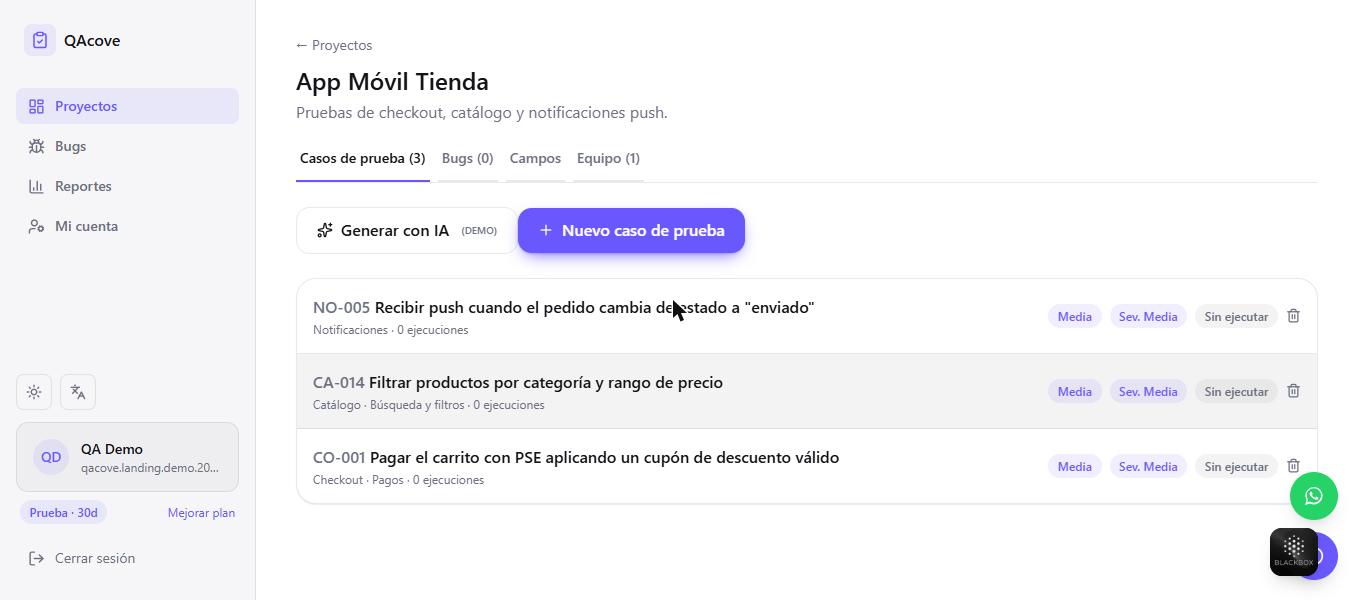
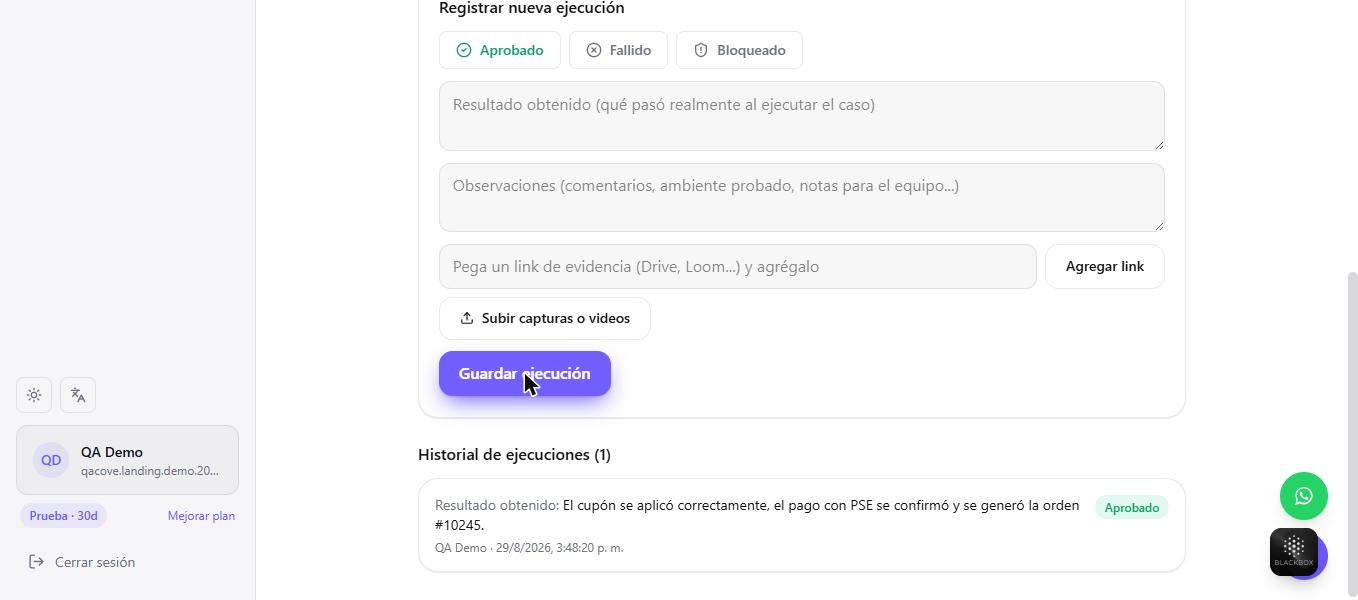
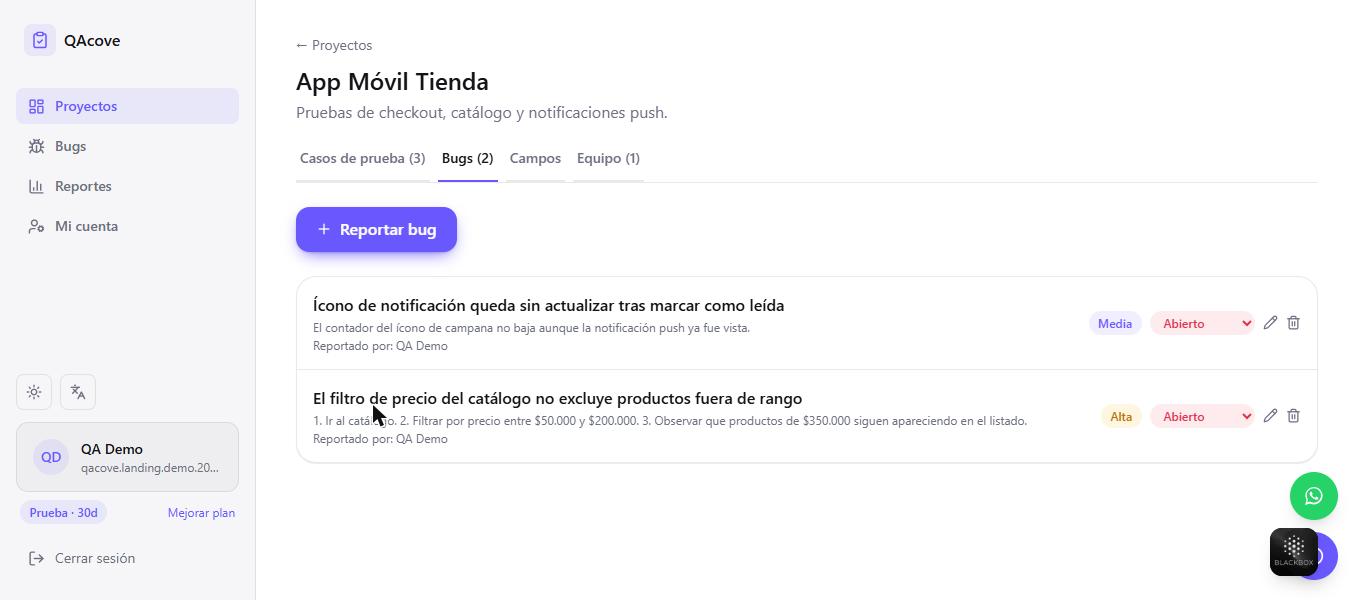
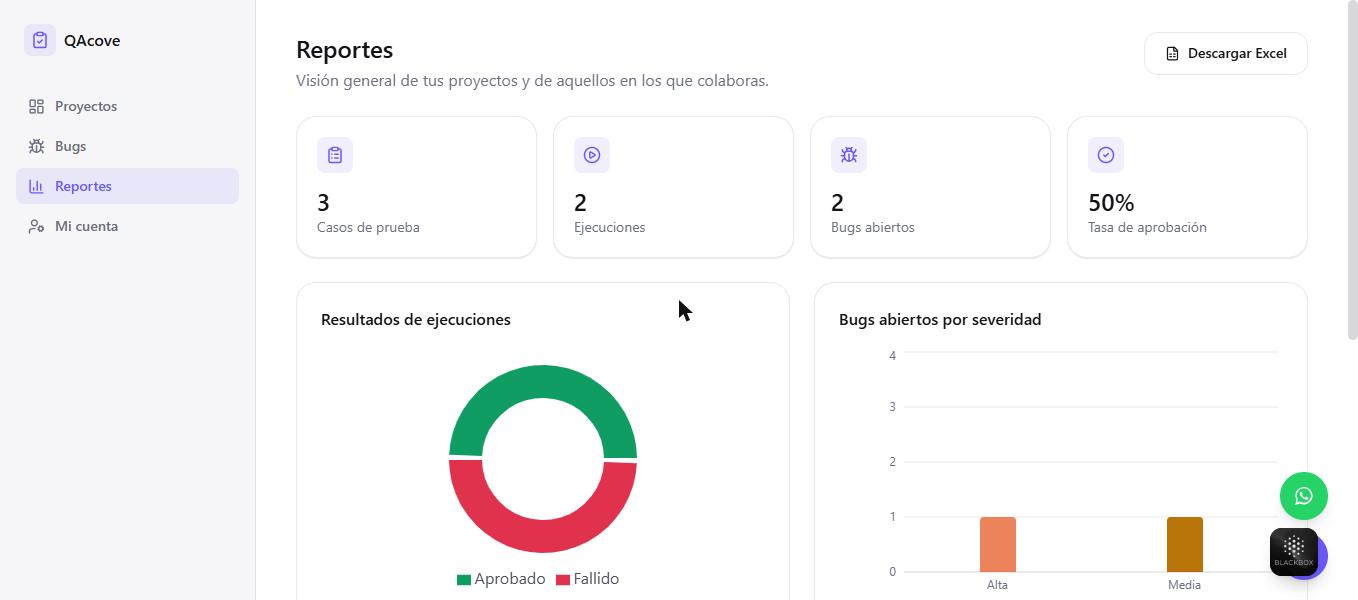
01/04Test cases organized by project, with steps and priority.
Simple pricing
Start free, upgrade as your team grows.
QAcove charges per account, not per seat: a team of up to 4 on the Pro plan pays about US$4 per person a month — other test management tools charge between US$35 and US$47 per user.
Free trial
Full access for 30 days, no card required.
- 30-day trial (1 project, 50 test cases)
- Unlimited runs, bugs, and reports
- Report generation and Excel export included during the trial
- 8 AI test case generations a month, so you can try it out
- When it expires, the account switches to read-only until you pick a plan
Pro
For a QA team that documents daily.
≈ US$16 USD/mo
- Up to 10 projects
- Up to 500 test cases per project
- Up to 3 people invited per project, besides you
- Unlimited runs and bugs
- Advanced reports and trends
- Report generation and Excel download
- 50 AI test case generations a month
Business
For teams that outgrew the Pro plan.
≈ US$29 USD/mo
- Up to 25 projects
- Up to 1,000 test cases per project
- Up to 8 people invited per project, besides you
- Unlimited runs and bugs
- Advanced reports and trends
- Report generation and Excel download
- 150 AI test case generations a month
Team
For multiple teams and projects, no limits.
≈ US$49 USD/mo
- Unlimited projects
- Unlimited test cases
- Unlimited people invited per project
- Advanced reports and trends
- Report generation and Excel download
- Unlimited AI test case generation
- Priority support
How does QAcove compare?
Prices and data verified on each vendor's official page in August 2026. USD conversion (~3,060 COP/USD) is only a rough reference — QAcove is always billed in Colombian pesos.
| QAcove (Pro) | TestRail (Professional) | Qase (Teams) | PractiTest (Team) | |
|---|---|---|---|---|
| Pricing model | Flat rate per account, not per seat | Per named-user license | Per user, 5-seat minimum | Per user, 10-seat minimum |
| Real cost for a 4-person team | US$16/month (whole plan, up to 4 people) | US$148/month (4 seats at US$37 each) | US$175/month (5-seat minimum at US$35 each, billed annually) | US$470/month (10-seat minimum at US$47 each) |
| AI-generated test cases | Yes, 50 generations/month included in Pro | Yes, AI features included in Professional | Yes, 2,000 AI credits/month on Teams | Yes, Smartfox assistant included in Team |
| Local payment methods (PSE, Nequi) on the same platform | Yes | No — international card in USD only | No — international card in USD only | No — international card in USD only |
| Native Spanish interface | Yes, native in Spanish, English and Portuguese | English-only interface | English-only interface | English-only interface |
| Integrations (Jira, Slack, CI/CD) and enterprise SSO | Slack and GitHub yes — Jira, CI/CD and enterprise SSO on the roadmap | Large integration catalog, SSO on Enterprise | 35+ integrations, SSO from the Teams plan | Jira integration, SSO/SCIM on the Corporate plan |
Sources: testrail.com/pricing, qase.io/pricing and practitest.com/pricing, checked in August 2026. Competitor prices change often — always verify on their official site before deciding.
Integrates with your workflow
Connect QAcove with the tools your team already uses.
Jira
Coming soonTrello
Coming soonGitHub
AvailableSlack
AvailableYour QA process, always documented
Every run is logged with date, result, and who ran it, so your team never loses track of what was tested and what's left.
170
test cases logged
174
runs documented
12
bugs reported
Frequently asked questions
What people ask us most before getting started.
What is QAcove?
A platform to document your entire QA process in one place: test cases, runs, bugs, and reports with charts — instead of spreading that information across loose spreadsheets and screenshots lost in chat.
Do I need a credit card to try it?
No. The 30-day free trial activates without asking for any payment method, with full access to runs, bugs, and reports.
What happens when the free trial ends?
Your account and data aren't deleted: they switch to read-only mode until you choose a paid plan. You can export your information at any time.
How does AI test case generation work?
From a description of the feature, QAcove suggests test cases with steps and expected results. Each plan includes a monthly number of generations (the free trial includes a few too, so you can try it).
Can I invite my team?
Yes. The Pro plan lets you invite up to 3 people per project in addition to you (up to 4 people working together on one project), and the Team plan has no limit on people or projects.
How are payments processed?
Through Wompi. QAcove never receives or stores your full card number — Wompi handles that directly.
Can I cancel anytime?
Yes. Plans are paid upfront (monthly or annual) with no auto-renewal and no minimum commitment.
What languages is QAcove available in?
Spanish, English, and Portuguese. You can change the interface language at any time from the language selector.